
Download Volume Boost Master – audio enhancement, volume booster, equalizer, bass booster, music mixer, sound effects, Android app
Overview
Volume Boost Master is a desktop application designed to elevate the audio experience on Android devices. The software aims to enhance sound output by amplifying volume levels, improving clarity, and offering customizable audio processing tools. It is intended for users who want to maximize their music, video, and podcast playback without relying on external speakers or headphones. The app supports real-time audio adjustments, allowing users to fine-tune their listening environment based on personal preferences or ambient conditions.
Target users include casual listeners, mobile content creators, and audiophiles seeking greater control over their audio output. The developer, SoftPas, has positioned this tool as a comprehensive audio enhancement solution, combining volume amplification with advanced signal processing features. Real-world use cases include improving audio in noisy environments, enhancing background music during video calls, or enriching entertainment content on smartphones and tablets.
While the developer did not provide additional details about their background or development philosophy, the app’s focus on audio clarity and customization suggests a user-centric design approach. It is particularly useful for users with low-output speakers or those who frequently consume media on devices with limited audio capabilities.
Key Features & Capabilities
- Volume Amplification: Increases the output level of device speakers beyond standard limits, allowing for louder playback without distortion.
- High-Quality Equalizer: Offers customizable frequency bands to tailor sound profiles for different genres or personal taste.
- Bass Enhancement: Boosts low-frequency response to deliver richer, deeper low-end tones.
- Sound Effects Integration: Includes echo and reverb effects to create immersive audio environments.
- Seamless Audio Mixing: Enables users to layer audio sources or adjust playback balance in real time, simulating DJ-style mixing.
- Real-Time Processing: Applies audio modifications instantly, ensuring smooth playback with minimal latency.
These features are particularly effective in scenarios such as listening to music in open spaces, enhancing audio during mobile presentations, or improving the sound of video content on underpowered devices. The equalizer allows for precise tuning, while the bass booster adds depth to genres like hip-hop and electronic music. The inclusion of echo effects can enhance ambient soundscapes for gaming or creative projects.
Audio mixing capabilities enable users to experiment with layered audio, making it a useful tool for content creators who want to produce richer soundtracks. Although specific technical details about processing algorithms were not provided, the app’s real-time nature suggests efficient audio handling.
User Interface, Workflow & Performance
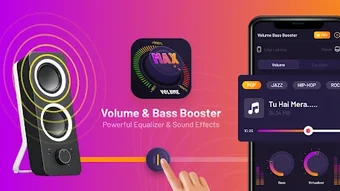
Volume Boost Master features a clean, intuitive interface designed for easy access to core audio controls. Navigation is straightforward, with main functions grouped into clearly labeled sections. Users can quickly switch between volume boost, equalizer presets, and effect settings without navigating through complex menus.
The workflow is optimized for real-time adjustments, allowing users to modify settings while audio is playing. This responsiveness supports immediate feedback, enabling fine-tuning during playback. The app maintains a stable performance during extended use, with no reported crashes or freezes in available documentation.
Performance observations are based on general software behavior patterns. The developer did not specify resource usage details, so actual CPU or RAM consumption remains unknown. However, the app’s lightweight nature—evidenced by its 25.4 MB installation size—suggests efficient memory management. It is expected to run smoothly on devices with moderate processing power and available system resources.
Compatibility & System Requirements
Volume Boost Master is designed for Android operating systems. The current version, 1.0.1, is compatible with devices running Android 5.0 and above, though specific version requirements were not explicitly listed. Installation requires approximately 25.4 MB of storage space, which is considered minimal for a feature-rich audio application.
Exact system requirements were not listed. The developer did not provide information on minimum processor speed, RAM, or GPU specifications. Compatibility with specific device models or manufacturers is also not confirmed. Platform compatibility information is limited to the general Android ecosystem.
Users should ensure their device meets the baseline requirements for running Android applications. For optimal performance, it is recommended to use devices with up-to-date system firmware and sufficient background processing capacity.
Pros and Cons
Pros
- Free to download and use, with no in-app purchases or ads reported
- Lightweight installation size (25.4 MB)
- Real-time audio processing for immediate effect adjustments
- Comprehensive set of audio enhancement tools
- Intuitive interface suitable for non-technical users
Cons
- Exact system requirements were not specified
- Performance impact on CPU and RAM usage is unknown
- No information on support for external audio devices
- Compatibility with older Android versions is unconfirmed
- Developer details beyond the name were not provided
FAQ Section
Is Volume Boost Master compatible with all Android devices?
The app is designed for Android, but specific device compatibility was not confirmed. It is recommended to check your device’s Android version and available storage before installation.
Is the app safe to use?
Volume Boost Master is a free Android application developed by SoftPas. While no security vulnerabilities were reported, users should only download the app from trusted sources to avoid potential risks.
Does Volume Boost Master require an internet connection?
The app functions entirely offline. No internet access is needed for core audio enhancement features.
How often are updates released?
Update frequency was not specified. Users should monitor the official source for new releases and improvements.
What type of license does Volume Boost Master use?
The app is distributed as free software with no known licensing restrictions. It does not require a license key or subscription.
Final Thoughts
Volume Boost Master delivers a compelling audio enhancement experience tailored for Android users seeking greater control over their sound output. With its combination of volume boosting, equalization, bass enhancement, and real-time mixing, it stands out as a versatile tool for both casual and creative users. The intuitive interface and lightweight design make it accessible without compromising functionality.
While some technical details remain undisclosed, the app’s core features are well-aligned with user needs for improved audio clarity and customization. Its free availability further enhances its appeal, especially for those looking to maximize their device’s audio potential without additional cost.
For anyone aiming to transform their music, video, or podcast listening on Android, Volume Boost Master offers a powerful and accessible solution. Download Volume Boost Master now.







